Key Takeaways
- Core Web Vitals are Google’s three page experience metrics: LCP (loading), CLS (visual stability), and INP (interactivity)
- They directly affect your Google search rankings — sites that fail CWV are penalised in competitive niches
- Lab scores (Lighthouse/PageSpeed Insights) and field data (CrUX/Search Console) measure different things — field data is what Google uses for rankings
- WordPress sites commonly fail CWV due to render-blocking resources, unoptimised images, layout shifts from ads/embeds, and heavy JavaScript
- Every Core Web Vital can be fixed — this guide covers the diagnosis and fix for each one
What are Core Web Vitals?
Core Web Vitals are three specific metrics that Google uses to measure how real users experience your website. They’re not optional recommendations — they’re a confirmed ranking factor that directly affects where your site appears in search results.

Google introduced the Web Vitals initiative in 2020, made them a ranking signal in June 2021, and has been steadily increasing their weight ever since. In March 2024, they replaced First Input Delay (FID) with Interaction to Next Paint (INP), making the metrics even more demanding. If you’re running a WordPress site in 2026 and haven’t addressed Core Web Vitals, you’re almost certainly losing rankings to competitors who have. This guide — part of our complete WordPress speed optimisation series — walks through everything you need to know.
The three metrics are deliberately focused on what users actually care about:
- LCP (Largest Contentful Paint) — How quickly does the main content load?
- CLS (Cumulative Layout Shift) — Does the page stay stable while loading?
- INP (Interaction to Next Paint) — Does the page respond quickly when I interact with it?
Together, they answer a simple question: does this page feel fast and stable to use? Google measures these on real Chrome users via the Chrome User Experience Report (CrUX) and uses the 75th percentile — meaning 75% of your visitors need to have a good experience for you to pass.
LCP — Largest Contentful Paint
LCP measures when the largest visible content element finishes rendering in the viewport. This is typically your hero image, a large heading, a video poster image, or the main text block above the fold. It answers the user’s question: “Has the page loaded?”
The thresholds are straightforward:
- Good: 2.5 seconds or less
- Needs Improvement: 2.5 – 4.0 seconds
- Poor: Over 4.0 seconds
On WordPress sites, the most common LCP element is the hero image on the homepage or a featured image on blog posts. The most common causes of poor LCP are slow server response time (TTFB), render-blocking CSS and JavaScript that delays painting, unoptimised images that take too long to download, and lazy loading applied to the LCP element — which is the single most common mistake we see.
We’ve written a complete guide to fixing LCP in WordPress that covers every cause and fix in detail.
CLS — Cumulative Layout Shift
CLS measures the visual stability of your page. Every time a visible element shifts position unexpectedly — text jumps down, a button moves, an image pushes content around — that counts as a layout shift. CLS aggregates these shifts into a single score.
The thresholds:
- Good: 0.1 or less
- Needs Improvement: 0.1 – 0.25
- Poor: Over 0.25
CLS is the sneakiest Core Web Vital. Your site can look perfectly fine in a quick test but fail badly in the field because CLS is measured across the entire session — including scrolling, ad injections, and late-loading content that lab tests don’t capture. The most common causes on WordPress: images without explicit width and height attributes, web font loading that causes text to reflow (FOUT/FOIT), dynamically injected content like cookie banners and ads, and Elementor animations that shift content on load.
Our CLS fix guide covers how to diagnose and eliminate every source of layout shift.
INP — Interaction to Next Paint
INP measures responsiveness. When a user clicks a button, taps a link, or types in a form field, INP measures the delay between that interaction and the browser’s visual response. It replaced First Input Delay (FID) in March 2024 because FID only measured the first interaction, while INP measures all interactions throughout the session and reports the worst one (approximately the 98th percentile).
The thresholds:
- Good: 200 milliseconds or less
- Needs Improvement: 200 – 500 milliseconds
- Poor: Over 500 milliseconds
INP is the hardest Core Web Vital for WordPress sites. The root cause is almost always JavaScript blocking the main thread — the browser can’t respond to user input because it’s busy executing scripts. WordPress sites loaded with analytics, chat widgets, social embeds, slider plugins, and page builder frontend JavaScript are the worst offenders. A site with 2MB of JavaScript will consistently fail INP regardless of how fast the server is.
Read our detailed INP fix guide for WordPress to learn how to diagnose and resolve interaction delay issues.
How to measure Core Web Vitals
There are two fundamentally different ways to measure Core Web Vitals: lab data and field data. Understanding the difference is critical because Google uses field data for ranking decisions, but lab data is what most people test with.
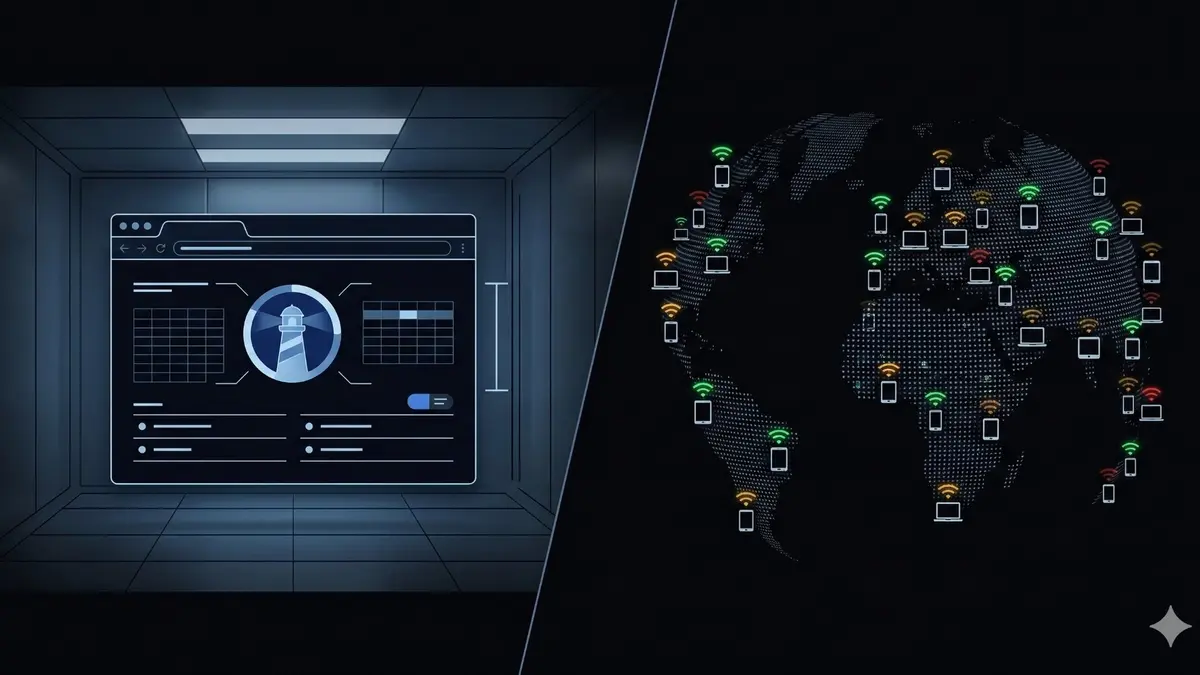
Lab data comes from synthetic tests — tools like Lighthouse, PageSpeed Insights (the lab section), and Chrome DevTools. These run a simulated page load under controlled conditions (fixed network speed, fixed device, no real user interaction). Lab data is useful for debugging specific issues but doesn’t represent real user experience.
Field data comes from real Chrome users who visit your site. Google collects this via the Chrome User Experience Report (CrUX) and displays it in Search Console, PageSpeed Insights (the “Discover what your real users are experiencing” section), and the CrUX dashboard. This is the data that determines your ranking impact.
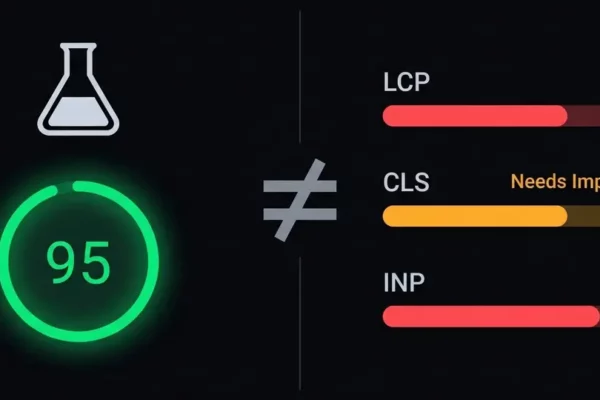
The distinction matters enormously. A site can score 95 on Lighthouse and still fail CWV in Search Console because real users on slow devices and unreliable networks have a different experience than a controlled lab test. For a deeper understanding of this difference, read our guide on Core Web Vitals vs PageSpeed score.
Here are the tools you should use:
- Google Search Console — Core Web Vitals report showing field data for your entire site. This is the definitive source.
- PageSpeed Insights — Shows both lab and field data for individual URLs. The field data section is labelled “Discover what your real users are experiencing.”
- Chrome DevTools → Performance tab — Best for debugging specific issues. Shows LCP timing, layout shift regions, and long tasks.
- web-vitals.js — A JavaScript library you can add to your site to collect real CWV data from your own users and send it to your analytics.
- CrUX Dashboard — A free Looker Studio template that visualises your CrUX data over time.
Core Web Vitals and SEO
Let’s be honest about this: Core Web Vitals are a ranking factor, but they’re not the most important one. Content quality, backlinks, and topical relevance still dominate. CWV acts as a tiebreaker — when two pages offer similar content, Google will rank the one with better page experience higher.
That said, the indirect SEO impact is often larger than the direct ranking boost. Faster, more stable sites get lower bounce rates, more pages per session, longer dwell times, and better engagement signals — all of which affect how Google perceives your content quality. We’ve seen clients gain 5-15% organic traffic after passing CWV, not because of the direct ranking boost, but because their improved speed reduced the bounce rate that was sending negative signals.
For an in-depth look at the data and what Google has publicly said, read our analysis of how Core Web Vitals affect SEO rankings.
WordPress-specific CWV challenges
WordPress powers over 40% of the web, but it has some unique characteristics that make Core Web Vitals especially challenging:
Theme bloat. Most WordPress themes load 200-500KB of CSS on every page, regardless of what’s actually used. Elementor-built pages routinely generate 100+ DOM elements for a simple layout. This render-blocking CSS directly affects LCP.
Plugin JavaScript. The average WordPress site loads 15-30 JavaScript files from various plugins — analytics, forms, sliders, social sharing, chat widgets, popup builders. Each one adds to the main thread blocking time that kills INP. And because plugins are independently developed, there’s no coordination between them — they all fire on page load simultaneously.
WooCommerce complexity. WooCommerce product pages have dynamic pricing, AJAX cart updates, variation selectors, and product image galleries. All of these require JavaScript that can block INP. Product images without proper dimensions cause CLS. Category pages with 50+ product thumbnails crush LCP if not properly lazy loaded (with the above-fold products excluded from lazy loading). We cover all of these challenges in detail in our WooCommerce Core Web Vitals guide.
Server response time. Many WordPress sites sit on shared hosting with TTFB of 500ms-2 seconds. You physically cannot achieve good LCP when the server takes that long to start sending HTML. TTFB is the foundation — everything else builds on top of it. Read our guide on reducing TTFB in WordPress for the server-level fixes.
The fix: a systematic approach
Don’t try to fix everything at once. Core Web Vital optimisation works best as a systematic process:
Step 1: Measure. Run your site through PageSpeed Insights and check your Search Console Core Web Vitals report. Identify which metric is failing worst — that’s where you start.
Step 2: Fix the foundation first (TTFB). If your Time to First Byte is over 400ms, fix that before touching anything else. Server-level caching, PHP version upgrade, and hosting quality are the levers here. A fast server makes every other fix more effective.
Step 3: Fix LCP. Once TTFB is solid, address Largest Contentful Paint. Identify the LCP element, preload it with fetchpriority="high", eliminate render-blocking CSS/JS, and make sure you’re not lazy loading it.
Step 4: Fix CLS. Add explicit width and height to all images and iframes. Fix web font loading. Reserve space for dynamic content. This is usually the quickest metric to fix.
Step 5: Fix INP. Defer non-critical JavaScript. Remove unnecessary plugins. Break up long tasks. This is typically the hardest fix because it requires understanding what each script does and whether it can be deferred without breaking functionality. Read our guide to fixing INP in WordPress for the specific techniques.
Step 6: Remeasure. After each fix, re-run PageSpeed Insights and wait for field data to update in Search Console (this takes 28 days). Don’t stack changes — fix one thing, verify it worked, then move on.
Monitoring and maintaining good CWV
Here’s something most guides don’t mention: passing Core Web Vitals today doesn’t mean you’ll pass tomorrow. Every plugin update can introduce new JavaScript. Every piece of new content can add unoptimised images. Every third-party script change can affect loading performance.
We’ve seen sites go from passing to failing CWV overnight because a plugin update added a new frontend script, or because an ad network changed their embed code, or because someone uploaded a 5MB hero image without compressing it.
Continuous monitoring is essential. At minimum, check your Search Console CWV report monthly. Better yet, set up automated synthetic testing that alerts you when scores drop. We run daily Lighthouse tests on every client site and catch regressions within 24 hours, before they have time to accumulate in field data and affect rankings.
Our guide to monitoring Core Web Vitals covers the complete setup — from free tools to enterprise-grade monitoring.
Do Core Web Vitals actually affect Google rankings?
Yes. Google has publicly confirmed that Core Web Vitals are part of the page experience ranking signal. They act primarily as a tiebreaker — when content quality and relevance are similar between competing pages, the one with better CWV will rank higher. The indirect impact through better engagement metrics (lower bounce rate, longer dwell time) can be even more significant than the direct ranking boost.
What’s the difference between Core Web Vitals and PageSpeed score?
PageSpeed score is a lab-based synthetic test using Lighthouse under controlled conditions. Core Web Vitals are field data from real Chrome users collected via the Chrome User Experience Report. Google uses CWV field data for ranking decisions, not PageSpeed scores. A site can score 95 on PageSpeed and still fail CWV if real users on slower devices have poor experiences.
How long does it take for CWV improvements to affect rankings?
CrUX data uses a 28-day rolling window. After you make improvements, it takes about 28 days for the field data to fully reflect the changes. Google then needs to recrawl and reprocess your pages. Most sites see ranking improvements 4-8 weeks after CWV fixes are verified in field data. The indirect benefits (reduced bounce rate, better engagement) can show up sooner.
Can a WordPress site pass all three Core Web Vitals?
Absolutely. This site is built on WordPress and passes all three with room to spare. The key is addressing the full stack — server configuration, database optimisation, theme efficiency, asset management, and JavaScript control. It requires engineering work beyond what plugins alone can achieve, but it’s entirely possible for any WordPress site.
Which Core Web Vital is hardest to fix on WordPress?
INP (Interaction to Next Paint) is consistently the hardest. It requires optimising JavaScript execution, which means understanding every script on your page — what it does, when it runs, and whether it can be deferred. WordPress’s plugin architecture means scripts from different plugins compete for main thread time with no coordination. CLS is usually the quickest to fix (add image dimensions, fix font loading), and LCP sits in the middle.

Not sure where to start?
Get your free Core Web Vitals audit
Our free audit identifies exactly which Core Web Vitals are failing and why. Then we fix every one of them — guaranteed.